
How to Automate Cash Flow Forecasting in Australia: A Practical Guide for Finance Teams
Ordron34 min read
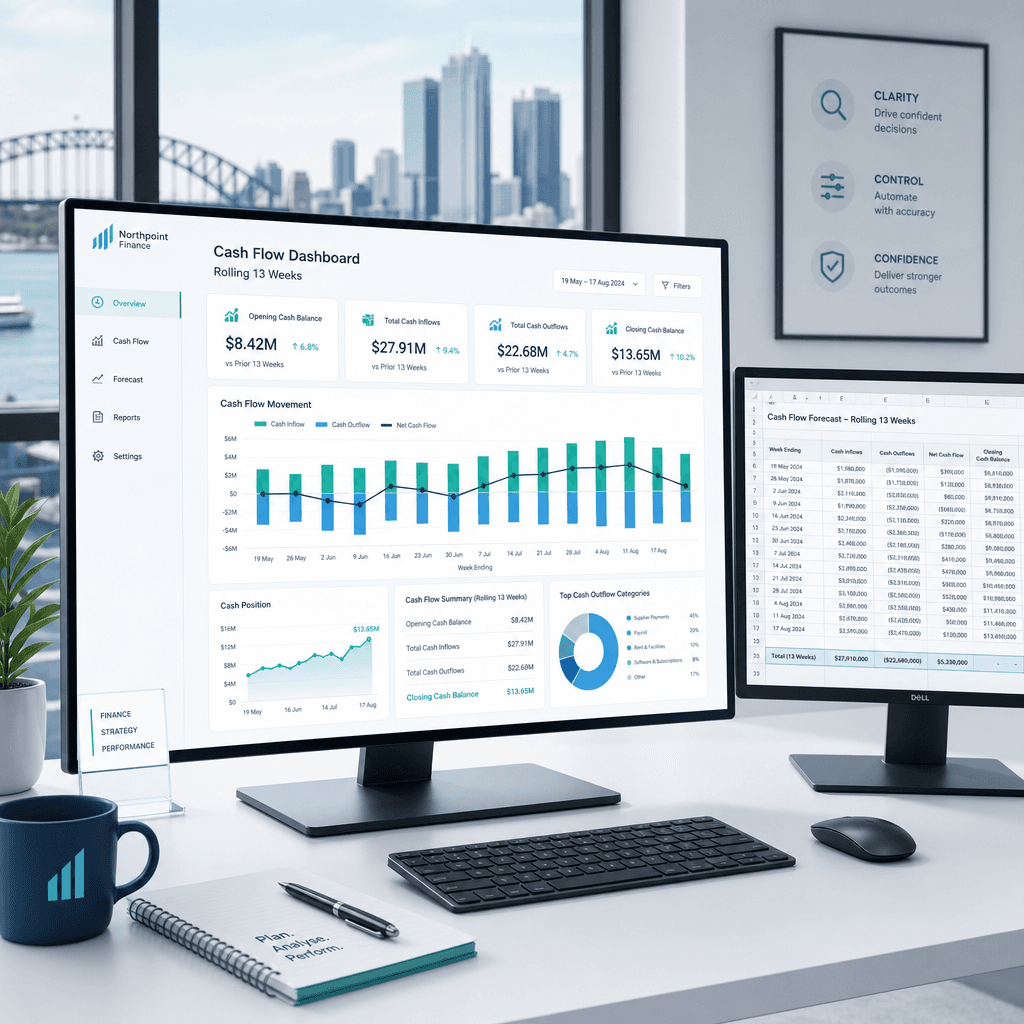
Most Australian finance teams are rebuilding their cash flow forecast every week from the same stale spreadsheet. They pull AR ageing from Xero, AP commitments from a separate tab, payroll from the payroll system, and BAS obligations from a calendar reminder. Then someone spends three or four hours stitching it together, and by the time the CFO reviews it, at least two of the inputs have already moved.
This is not a minor inconvenience. It is a structural problem. A forecast built on last Tuesday's data does not tell you where your cash position will be in eight weeks. It tells you where it was. For a distribution business managing supplier payment terms, a freight operator with lumpy debtor collections, or any SME navigating the GST/BAS cycle, that lag is the difference between a proactive decision and a reactive one.
Cash flow forecasting automation replaces that manual assembly process with a rolling, connected model that updates from live data sources. This guide covers what that actually means in an Australian operating context, how to build a 13-week rolling forecast that is genuinely useful, which data inputs to automate first, how to connect Xero and MYOB to a forecasting layer, and what the realistic caveats are. No aspirational projections here. Just the mechanics, with the numbers attached where they are real.
Key Takeaways
- Cash flow forecasting automation replaces manual data assembly with a live, rolling model connected to your existing accounting software, bank feeds, and operational systems.
- Manual forecasts fail not because finance teams lack skill, but because the inputs, AR timing, AP commitments, GST/BAS obligations, payroll, are fragmented across systems and always slightly out of date.
- The 13-week rolling cash flow forecast is the operational gold standard for Australian SMEs: short enough to be accurate, long enough to manage liquidity decisions.
- Xero and MYOB both expose data via API and bank feed integrations; automation that actually connects the software you already have does not require a platform migration or a new ERP.
- Accuracy improves when you automate inputs, but forecasts remain probabilistic. Data hygiene is a prerequisite, not an afterthought.
- Scenario modelling and variance tracking are the two capabilities that separate a genuinely useful automated forecast from a faster version of what you already had.
Summary Table: Manual vs Automated Cash Flow Forecasting
| Factor | Manual Forecast | Automated Rolling Forecast |
|---|---|---|
| Build time per cycle | 3-6 hours | Under 30 minutes (review only) |
| Data freshness | Lag of 1-5 days depending on inputs | Near real-time from bank feeds and accounting system |
| Forecast frequency | Weekly at best, often fortnightly | Daily or weekly, automated refresh |
| Data sources connected | Manually pulled from 3-5 disconnected sources | AR/AP ageing, payroll, BAS calendar, bank feeds, ERP |
| Scenario modelling | Ad hoc, one version at a time | Multiple scenarios maintained in parallel |
| Variance tracking | Manual comparison after the fact | Automated actuals vs forecast reconciliation |
| Risk of human error | High (copy-paste, formula drift) | Low (validated at source) |
| GST/BAS timing visibility | Estimated from calendar | Pulled from lodgement schedule and ATO payment history |
| Suitable for | Stable, low-complexity businesses | Any business with variable cash flows, multiple entities, or growth plans |
What Is Cash Flow Forecasting Automation?
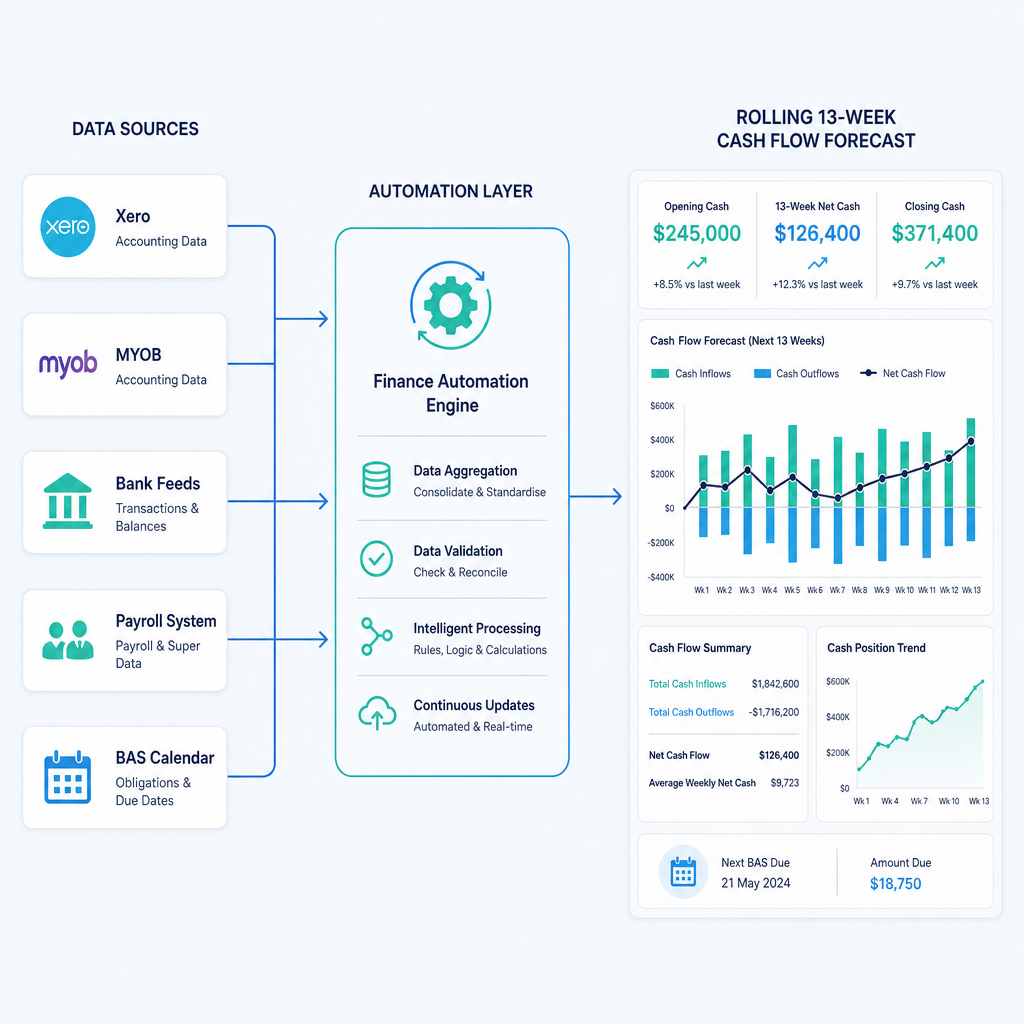
Cash flow forecasting automation is the practice of replacing manual data collection and spreadsheet assembly with a connected system that pulls live inputs, applies forecasting logic, and produces an updated cash position view without requiring a finance team member to rebuild it from scratch each cycle.
The word "automation" here does not mean a single piece of software you switch on. It means an automation layer, a set of connections between the data sources your finance team already uses, that extracts, validates, and consolidates the inputs a cash flow forecast depends on. That layer might sit inside a dedicated forecasting tool, inside your existing accounting platform, or in a custom integration that connects your ERP, payroll system, and bank feeds to a reporting environment.
The critical distinction is between automating the data assembly and automating the forecasting judgement. Automation handles the former reliably. The latter, deciding which debtors will pay on time, whether a supplier contract will be renewed, how a large project milestone payment will affect next month's inflows, still requires a finance professional. What automation does is give that professional current, validated data to work with instead of stale, manually assembled data.
What Gets Automated in Practice
A well-designed cash flow forecasting automation covers these inputs:
- Accounts receivable ageing, pulled directly from Xero or MYOB, mapped to expected collection dates based on customer payment history and agreed terms.
- Accounts payable commitments, including approved invoices not yet due and recurring supplier obligations, drawn from the accounting system or ERP.
- Payroll run dates and net amounts, sourced from the payroll system (KeyPay, Employment Hero, MYOB Payroll) and mapped to specific disbursement dates.
- BAS and PAYG withholding obligations, calculated from lodgement schedule and GST position, which in an Australian context creates predictable but easily missed cash outflows on a quarterly or monthly lodgement cycle.
- Superannuation guarantee payments, which are due quarterly but often modelled incorrectly because teams forget to account for the gap between the accrual date and the actual payment date to the super fund.
- Bank account balances, pulled daily from bank feeds to anchor the opening position.
- Known large one-off outflows: lease payments, insurance renewals, capital expenditure commitments.
What Automation Does Not Replace
Automation does not replace the forecasting judgement your finance team applies to uncertain future cash flows. A large debtor who is 45 days overdue may or may not pay in week three of your 13-week window. Automation can flag the overdue balance and apply a probability weighting based on historical payment behaviour, but a finance manager who has spoken to that customer's accounts payable team has information the system does not. The value of automation is that it surfaces these decisions clearly and quickly, rather than burying them in a spreadsheet that took four hours to build.
Why Manual Cash Flow Forecasts Break
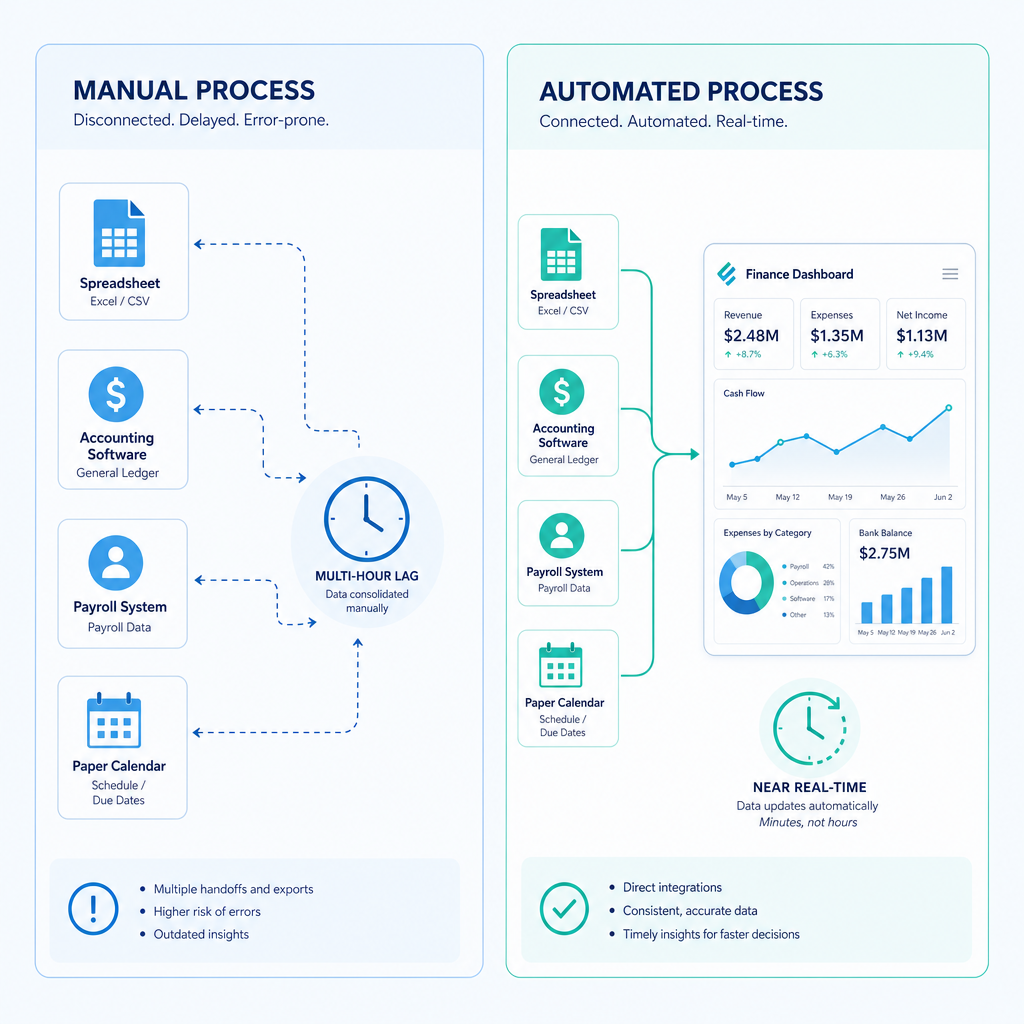
Manual forecasting fails in predictable ways. Understanding them is useful because it clarifies exactly which parts of the process automation needs to address.
Stale Inputs Create a False Sense of Precision
A spreadsheet forecast that took three hours to build last Tuesday looks authoritative. It has formulas, it has subtotals, it has a chart. But every input in it reflects the state of the world on Tuesday. If a major customer paid on Wednesday, that inflow is missing. If a supplier sent an unexpected invoice on Thursday, that outflow is missing. The forecast is precise in presentation and unreliable in substance.
This matters more for Australian businesses than it might seem, because the Australian SME operating environment has several cash flow events that land unpredictably within a quarter. A BAS lodgement due on the 28th of the month following quarter-end, a superannuation payment due 28 days after the end of each quarter, and payroll runs that may not align neatly with debtor collection cycles all create timing gaps that a manually assembled forecast handles inconsistently.
GST and BAS Timing Is Systematically Underestimated
This is a specific failure mode I see repeatedly in Australian SME forecasts. The GST liability accrues progressively across a quarter, but the cash payment does not leave the account until the BAS lodgement deadline. Finance teams who manage their cash position week to week without a dedicated BAS reserve can find themselves short in the lodgement month, not because the business is unprofitable, but because the GST timing was not modelled properly.
The ATO's cash flow guidance for small business consistently flags BAS timing as one of the most common causes of liquidity shortfalls in otherwise viable businesses. Automating the BAS forecast means calculating the running GST position from actual invoices in Xero or MYOB rather than estimating from last quarter's lodgement.
Debtor Timing Assumptions Drift from Reality
Most manual forecasts apply a blanket assumption to receivables: "30-day terms, so all outstanding invoices will be collected in 30 days." Real debtor behaviour does not work this way. In an Australian distribution or logistics context, a large retail chain customer might pay consistently at 45 days regardless of agreed terms. A government debtor might pay reliably but only after specific approval cycles. A small trade customer might pay early or late depending on their own cash position.
Automated AR ageing analysis, connected to actual payment history, produces a weighted collection forecast that reflects how each debtor actually behaves rather than how their contract says they should behave. That distinction materially affects forecast accuracy, particularly in weeks four through eight of a 13-week model.
FX Exposure Complicates Multi-Currency Inputs
For Australian importers with USD or EUR-denominated supplier invoices, or exporters with foreign currency receivables, a manual forecast that applies a fixed exchange rate to future cash flows will drift from reality as rates move. An automated forecast connected to a live FX feed and your accounting system's multi-currency module can apply current rates or a specified hedge rate to each foreign currency cash flow, producing a more accurate AUD cash position.
Human Error in Assembly Is Inevitable at Scale
When a finance team member spends three hours each week copying figures from Xero, adding payroll from a separate system, and updating BAS estimates in a spreadsheet, the error rate is not zero. Formula breaks, copy-paste errors, and version control issues are not a reflection of the team's competence. They are a predictable outcome of a manual assembly process that was not designed to be error-free. Automation removes the assembly step and with it the class of errors that assembly produces.
Direct vs Indirect Method: Which One to Automate
The direct method forecasts cash flows from actual expected cash receipts and payments. The indirect method starts with net profit and adjusts for non-cash items and working capital changes. For a 13-week operational forecast, the direct method is almost always the right choice.
Here is why: the indirect method is well-suited to annual financial planning and to understanding the relationship between profitability and cash generation over long periods. It is not well-suited to answering "will we have enough cash to pay payroll and super on the 15th of next month and still meet the BAS payment on the 28th?"
The direct method requires more granular inputs, but those inputs are exactly what an automated system is well-positioned to provide: actual invoice data, actual payment dates, actual bank transactions. If your accounting data in Xero or MYOB is clean and current, the direct method forecast is both more accurate and more automatable than the indirect method for operational purposes.
For longer-horizon strategic forecasting (12 months and beyond), a hybrid approach is common: use the direct method for the 13-week window where transaction-level data is reliable, and transition to the indirect method for the months beyond where you are working from revenue projections rather than actual invoices.
Building a Rolling 13-Week Cash Flow Forecast
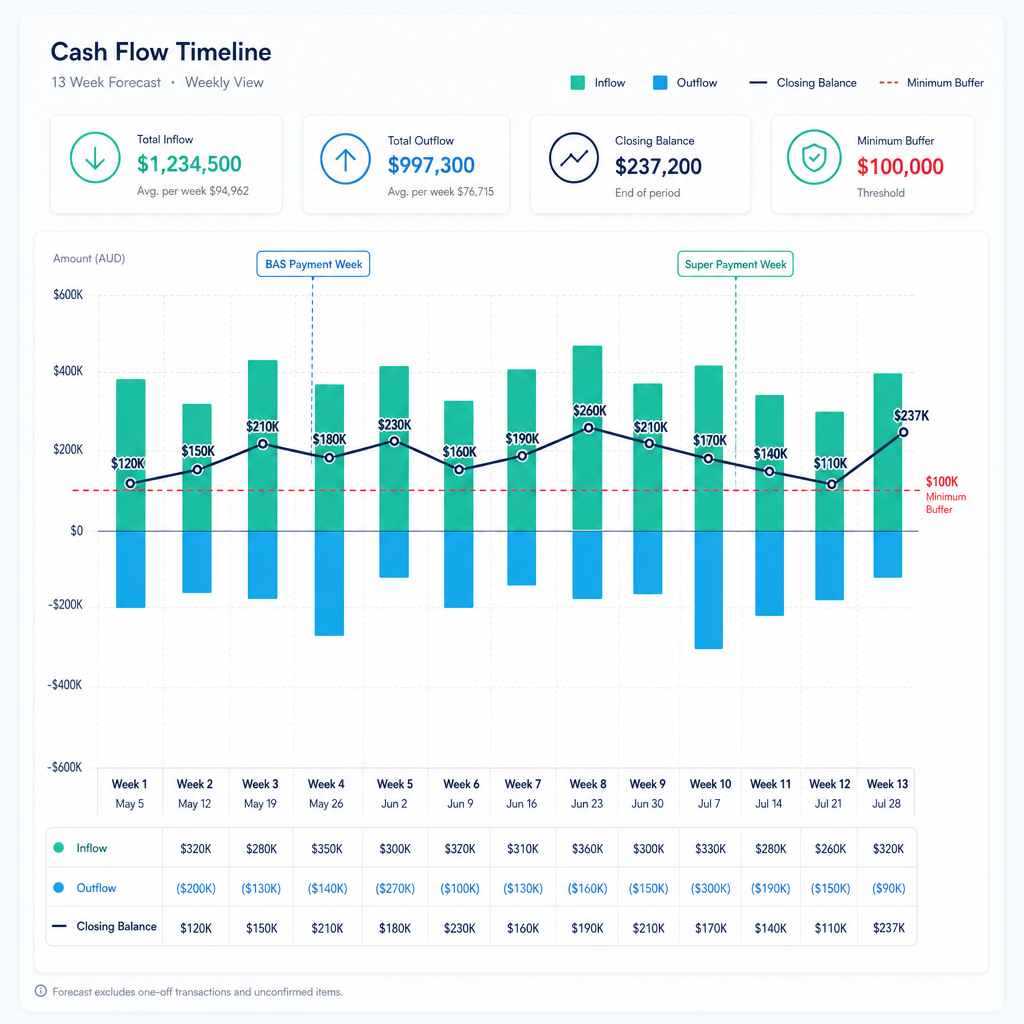
The 13-week rolling cash flow forecast is the operational standard for a reason. Thirteen weeks is approximately one quarter, which means it captures a full BAS and superannuation cycle. It is short enough that the transaction-level data in your accounting system gives you meaningful inputs for at least the first six to eight weeks. And it rolls forward each week, so you always have a 13-week forward view rather than a static forecast that ages as time passes.
The Structure of a 13-Week Model
A well-constructed 13-week model has these components:
Opening bank balance: Pulled directly from a bank feed for each account, confirmed against the reconciled balance in the accounting system. This is the anchor for every calculation that follows.
Cash inflows by week: Built from AR ageing buckets (current, 30 days, 60 days, 90-plus days), weighted by customer payment history, plus expected inflows from new invoices to be raised based on sales pipeline or contracted recurring revenue.
Cash outflows by week: AP commitments from approved and pending invoices mapped to payment due dates, payroll run amounts on scheduled dates, BAS payment on lodgement deadline, super contributions on quarterly due dates, and any known large non-recurring outflows.
Closing bank balance by week: Opening balance plus inflows minus outflows for each week. This is the number the CFO actually needs: the projected closing balance at the end of each of the next 13 weeks.
Minimum balance buffer: A line showing the minimum acceptable closing balance (often set at one to two weeks of operating expenses). Any week where the projected closing balance falls below this line is a liquidity risk that needs management attention now, not in week eight.
Rolling the Forecast Forward
A rolling forecast adds week 14 as week 1 drops off, so the horizon stays constant at 13 weeks. In a manual process, this means rebuilding the model every week. In an automated process, it means the system refreshes the inputs from live data sources, advances the week reference, and the finance team reviews the output rather than rebuilding it.
The difference in time is significant. A manually rebuilt 13-week forecast takes three to six hours per week. An automated rolling forecast where the finance team reviews, adjusts assumptions, and signs off takes under 30 minutes. That is hours returned to the team every single week, compounding across the year.
Probability Weighting and Scenario Ranges
A single-point forecast is a starting point, not a finished product. For each cash inflow that carries collection risk, a well-designed model applies a probability weight. A debtor with a strong payment history and a balance well within their normal terms might carry a 95 per cent probability of collection in the forecast week. A debtor who is 60 days overdue and has been unresponsive might carry 40 per cent.
This is not complicated to implement in an automated system. It requires a payment history table per debtor and a weighting rule that the finance team reviews periodically. The output is a probability-adjusted cash inflow forecast that is more honest about uncertainty than a deterministic model.
Data Inputs to Automate: AR, AP, Payroll, BAS, Super
The quality of a cash flow forecast is determined by the quality of its inputs. Automation does not fix bad data. It does eliminate the manual steps that introduce errors during data assembly, and it makes data quality problems visible immediately rather than after a finance team member has spent hours building a forecast on top of them.
Accounts Receivable Ageing
AR ageing is the most important input for the inflows side of a direct method forecast. Automating it means connecting to Xero or MYOB via API, extracting the current AR ageing report, and mapping each invoice to a forecast collection week based on due date and customer payment history.
For a mid-sized freight operator I worked with, AR reconciliation was manual, GL coding was inconsistent, and the aged-receivables view was always out of date. We automated GL tagging, bank reconciliation, and aged-receivables reporting directly within the Xero environment, no platform migration required. AR reconciliation time dropped by 80 per cent, and the finance team had a real-time aged-receivables view on an ongoing basis. That real-time view became the foundation of a reliable cash inflow forecast.
For more detail on automating bank reconciliation and AR within Xero, the Ordron guide on automating bank reconciliation in Xero and MYOB covers the mechanics in depth.
Accounts Payable Commitments
AP commitments are the most predictable component of the outflows side, because approved invoices with due dates are, by definition, known quantities. The automation task is extracting AP data from the accounting system, validating payment terms, and populating the forecast outflow schedule.
The complication for Australian businesses is that AP data is often not all in one place. A national operator might have invoices approved in Xero at head office and paper invoices being processed at depots. Automating AP inputs to a cash flow forecast requires that the AP process itself is sufficiently digitised to produce clean, structured data. This is why AP automation and cash flow forecasting automation are closely connected workstreams. You cannot build a reliable automated AP outflow forecast on top of a manual, paper-based AP process.
Payroll
Payroll is a highly predictable cash outflow that is surprisingly often modelled imprecisely in manual forecasts. The automation is straightforward: connect to the payroll system, extract the scheduled run dates and net payroll amounts for the next 13 weeks, and map them to the forecast. The only complexity is ensuring the forecast reflects superannuation payment dates separately from salary payments, because the cash leaves the account at different times.
BAS and PAYG Withholding
This is the input that most manual Australian forecasts handle worst. The GST position accumulates from invoices raised and received during the quarter, but the cash payment occurs at the BAS lodgement deadline. In a monthly BAS lodgement cycle, the payment is due 21 days after month end. In a quarterly cycle, it is due on the 28th of the month following quarter end (or later if lodging via a tax agent).
Automating this input means calculating the running GST position from actual transactions in Xero or MYOB, applying the lodgement schedule, and projecting the BAS payment into the forecast week when cash will actually leave the account. The ATO publishes lodgement due dates and the Australian Small Business and Family Enterprise Ombudsman (ASBFEO) has noted that BAS timing is one of the most consistent contributors to cash flow shortfalls in SMEs that are otherwise profitable.
Superannuation Guarantee
Super contributions are due 28 days after the end of each quarter (28 October, 28 January, 28 April, 28 July). Many manual forecasts either miss these entirely or model them on the accrual date rather than the payment date. The cash impact can be material for a business with a large payroll. Automating this means extracting the accrued super balance from the payroll system at the end of each quarter and mapping the projected payment to week four of the following quarter.
Connecting Xero, MYOB, and Bank Feeds
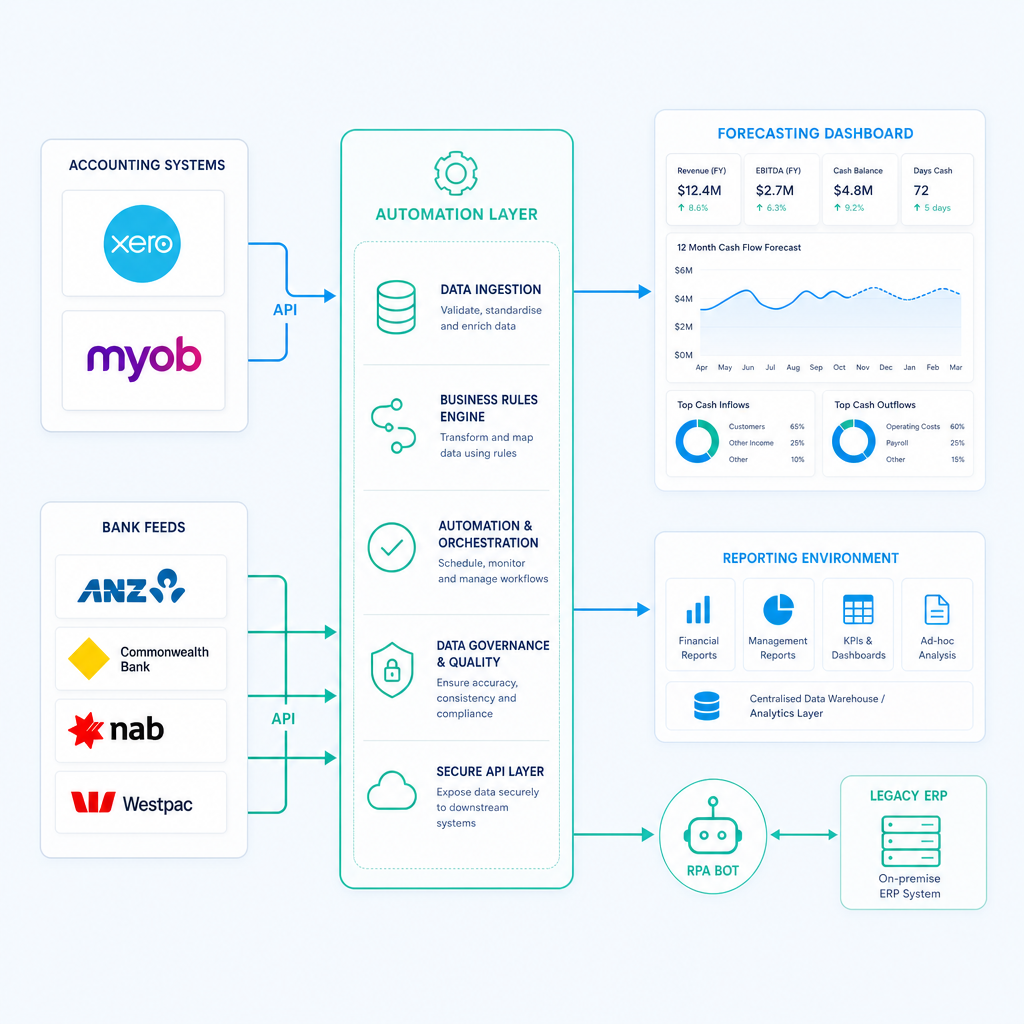
Xero and MYOB are the two dominant accounting platforms for Australian SMEs, and both expose structured data that can be connected to a cash flow forecasting layer. The question is not whether the connection is possible. It is how to build it in a way that is reliable, maintains data integrity, and does not require constant maintenance.
Xero API and Bank Feeds
Xero's API gives programmatic access to invoices, payments, contacts, bank transactions, and financial reports. A cash flow forecasting automation built on Xero can pull AR ageing, AP commitments, and reconciled bank balances directly, without any manual export or copy-paste.
Xero's bank feed connections cover most major Australian banks, including ANZ, CBA, NAB, and Westpac, as well as a range of smaller institutions. A daily bank feed sync means the opening balance in your 13-week model is always the prior business day's closing balance, validated against the reconciled position in Xero.
For businesses already using Xero and MYOB as part of a broader finance automation programme, the cash flow forecasting layer typically connects to data that is already being maintained for other purposes. You are not creating new data pipelines; you are reading from pipelines that should already exist.
MYOB and AccountRight
MYOB AccountRight and MYOB Business both offer API access to core accounting data. The data model is somewhat different from Xero's, and MYOB's bank feed coverage is slightly narrower, but the fundamental capability is the same: programmatic access to AR, AP, and bank transaction data that can feed a forecasting model.
For businesses on MYOB AccountRight with a local SQL database, there is also the option of direct database queries for more granular data extraction, which can be useful for businesses with complex chart-of-accounts structures or multi-entity reporting requirements.
Legacy ERPs and Systems Without APIs
This is where many conversations about cash flow forecasting automation get stuck. A finance team that runs a legacy ERP alongside Xero, or that has operational systems with no API capability, is often told they need to upgrade or replace the legacy system before automation is possible.
That is not accurate. I worked with a family-owned logistics operator that had been running a twenty-year-old ERP with no APIs alongside Xero. Finance staff were manually re-keying data between systems every month, and reporting was always behind. We built an RPA bot that drives the legacy ERP interface directly, validates extracted data against SQL, and syncs clean records into Xero and live reporting dashboards, without replacing or modifying the ERP. The result was 160-plus hours of manual work eliminated per month, with real-time reporting available for the first time.
The same principle applies to cash flow forecasting automation. If your operational data lives in a system with no API, automation can still extract it. The automation layer sits on top of whatever is already running. You do not need a new ERP to get a reliable automated cash flow forecast.
If you are evaluating whether this type of approach is right for your finance team, the Ordron finance automation ROI guide covers how to build the business case with real numbers rather than vendor projections.
Scenario Modelling and Variance Tracking
An automated forecast that runs one scenario and produces one closing balance per week is better than a manual forecast. But it is not as useful as an automated forecast that maintains three scenarios and tracks variance against actuals.
Building Scenarios That Are Actually Useful
Scenario modelling in a cash flow forecast is not about stress-testing extreme outcomes. It is about quantifying the cash impact of decisions and uncertainties that are already on the table.
For an Australian distribution business, relevant scenarios might include:
- Base case: AR collects at historical average payment timing, no new large orders, all AP paid to terms.
- Downside case: The top two debtors by balance both pay 15 days later than the historical average. What does the closing balance look like in weeks four through eight?
- Upside case: A large new order confirmed in week two adds $180,000 of inflows in week six. Does the business need to draw on its overdraft facility before that inflow lands, or does the existing cash position cover the additional AP commitments that come with fulfilling the order?
These scenarios do not require a complex model. They require the base case forecast to be automated so that the finance team has time to run the scenarios rather than rebuilding the base case.
Variance Tracking: Where Most Forecasts Fall Short
Variance tracking is the practice of comparing each week's actual cash position to what the forecast predicted and explaining the differences. It closes the feedback loop between forecasting and reality, and it is the primary mechanism by which cash flow forecast accuracy improves over time.
In a manual process, variance tracking rarely happens systematically because there is no time. The finance team is already spending their available hours building next week's forecast.
In an automated process, variance tracking can be built into the model: actual closing balances from bank feeds are automatically compared to forecast closing balances from the prior week, and material variances are flagged for review. Over time, this process identifies which inputs have systematic forecast errors (typically, specific debtors whose payment timing is consistently modelled incorrectly) and allows the team to improve the model's weighting rules.
This is also the mechanism by which you validate whether your automation is working. Measured after go-live, across a 12-week period, does the automated forecast's week-four closing balance prediction fall within five per cent of actual? If not, the variance analysis tells you why.
Distribution Sector Example: On-Demand Reporting and Forecasting
One of the clearest examples I can point to of what automated cash flow reporting looks like in practice is a distribution operator I have worked with, whose on-demand reporting case is documented in the Ordron case study library.
The business was running its cash position analysis from a combination of Xero exports and a manually maintained spreadsheet. Finance team time was concentrated on data assembly rather than analysis. The forward-looking cash view was built once a week and was already partially stale by the time it was reviewed.
The automation connected Xero's AR and AP data, the bank feeds for three operating accounts, and payroll run data from the payroll system into a single reporting and forecasting environment. The result was a rolling cash position view that updated daily without manual intervention. The finance team moved from spending the majority of their forecasting time on data assembly to spending it on reviewing the automated output and modelling scenarios.
This outcome is not unusual. It is the pattern I see consistently: the hours that come back to the team are the assembly hours, and those hours get reinvested in analysis and decision support. That is the actual value of cash flow forecasting automation, not a faster spreadsheet, but a finance team that has time to use the forecast rather than just build it.
Implementation Steps: How to Get Started
Implementing cash flow forecasting automation does not need to happen all at once. The most reliable approach is to automate the highest-value inputs first, validate accuracy, and then extend the automation to additional data sources.
Step 1: Assess Your Data Quality
Before automating anything, audit the quality of the data in your accounting system. Are AR records current and reconciled? Is AP data complete, with due dates and approved statuses accurately recorded? Is your chart of accounts structured consistently enough to produce clean cash flow categorisation?
Garbage in, garbage out is not a cliche here. It is the single most common reason cash flow forecasting automation projects underdeliver. An automated system that pulls stale, inconsistently coded data from Xero and assembles it into a forecast produces a stale, inconsistently coded forecast faster than a manual process. Speed is not the goal. Accuracy is.
If your data hygiene is not ready, the first investment is in fixing the upstream processes. The Ordron guide on month-end close bottlenecks covers the most common upstream data quality issues that affect both close processes and forecasting.
Step 2: Define Your Forecast Structure
Decide on your forecast horizon (13 weeks is the standard recommendation for operational forecasting), your frequency of refresh (weekly is the minimum; daily is achievable with bank feed automation), and the categories of inflow and outflow that matter for your business. For an Australian business, this should include explicit line items for BAS, PAYG withholding, and super contributions.
Step 3: Connect Your Primary Data Sources
Start with the two inputs that drive the most forecast value: AR ageing (for inflows) and AP commitments (for outflows). Connect these to your accounting system via API. Validate the output against your current manual forecast to confirm the automation is reading the data correctly.
Step 4: Automate Bank Balance Synchronisation
Connect bank feeds to anchor your opening balance. This removes the risk of the forecast running from a balance that does not reflect recent transactions.
Step 5: Add Payroll and BAS Inputs
Once the AR/AP and bank balance automation is running reliably, add payroll run data and the BAS forecast. These are highly predictable outflows and their inclusion significantly improves forecast accuracy in the weeks around lodgement deadlines.
Step 6: Build Variance Tracking and Scenario Capability
With the base automated forecast running, build in variance tracking (actual vs forecast per week) and define two or three standard scenarios. Schedule a monthly review of variance patterns to improve the model over time.
Step 7: Review After Go-Live, Not Before
This is the step most implementation guides skip. Before automation is valuable, it has to prove itself against actual outcomes. Set a 12-week post-go-live review: compare automated forecast closing balances to actual closing balances for each week, identify the largest variance sources, and adjust the model. The goal is not perfection at go-live. The goal is a model that measurably improves over the first quarter of operation.
The number worth quoting is not the projected accuracy from a vendor demonstration. It is the accuracy the model achieved in your business, with your data, measured after it has been running in production. That is the only number that tells you whether the automation is working.
Choosing the Right Cash Flow Forecasting Software for Australian Businesses
The Australian market for cash flow forecasting software ranges from purpose-built treasury management tools to add-ons for Xero and MYOB, to custom-built automation layers. The right choice depends on the complexity of your cash flows, the number of entities, and the systems you are already running.
Dedicated Cash Flow Forecasting Tools
Purpose-built platforms such as Float, Fathom, and Futrli all connect to Xero and MYOB and provide rolling forecast capability. Float is particularly well-regarded for direct method forecasting and has strong Australian market penetration among SMEs. These tools are appropriate for businesses that want a usable product quickly and whose cash flow complexity is within the product's standard feature set.
The limitation of dedicated tools is that they work best when your accounting data is clean and your workflow fits the product's assumptions. If you have a legacy ERP, multiple bank accounts across entities, or payroll data in a system the tool does not natively connect to, you will hit gaps that require workarounds.
Xero and MYOB Native Forecasting
Both Xero and MYOB have native cash flow reporting and forecasting features, though these are more limited than dedicated tools. Xero's business snapshot and short-term cash flow features provide a basic forward view. MYOB's cash flow manager provides similar baseline functionality. For very small businesses with simple cash flows, these native features may be sufficient. For finance teams with more sophisticated requirements, they are a starting point rather than a destination.
Custom Automation Layers
For businesses with legacy systems, multi-entity structures, or cash flow processes that do not fit standard product assumptions, a custom automation layer is often the right answer. This means automation that is built around your actual workflow, not around an idealised version of it. The trade-off is that custom solutions take longer to implement and require a capable implementation partner, but they can connect data sources that off-the-shelf products cannot reach.
If you want to understand what a custom automation approach would look like for your specific finance operation, the place to start is a conversation with the Ordron team. The engagement starts with the actual process, not a product catalogue.
Realistic Caveats: What Automation Cannot Fix
Cash flow forecasts are probabilistic, not deterministic. Automation improves the quality and freshness of inputs, and it removes the manual assembly burden, but it does not eliminate uncertainty. A well-automated forecast is a better estimate, not a guarantee.
The most important caveat is data hygiene. If your accounting system has unreconciled transactions, incorrectly dated invoices, or AR records that do not reflect actual collection timing, the automated forecast will reflect those problems immediately and visibly. That visibility is actually useful, because it forces data quality issues into the open rather than hiding them in a spreadsheet. But fixing those issues requires process improvement upstream of the automation, not just better forecasting software.
The second caveat is that forecasting accuracy degrades with horizon. Weeks one and two of a 13-week forecast should be highly accurate, because the inputs are largely known quantities. Weeks ten through thirteen are informed estimates, and should be treated as such. Automation does not change this fundamental characteristic of forward-looking models.
The third caveat is that scenario modelling requires human input to be valuable. The scenarios have to reflect actual business uncertainties, and interpreting the output requires someone who understands the business context. Automation delivers the numbers. Finance professionals deliver the judgement.
References
-
Australian Taxation Office (ATO), Cash flow and business finance guidance: The ATO publishes practical guidance for small business operators on managing GST cash flow, BAS lodgement timing, and superannuation payment obligations. The ATO's small business cash flow content is the primary reference for Australian-specific tax timing impacts on operating cash flow.
-
Australian Small Business and Family Enterprise Ombudsman (ASBFEO), Cash flow management resources: ASBFEO publishes research and practical tools on cash flow management for Australian SMEs, including data on the frequency and causes of cash flow shortfalls in viable small businesses. ASBFEO's cash flow guidance specifically identifies BAS timing and debtor payment delays as the two most common structural contributors to liquidity problems.
-
Xero Developer Documentation, Accounting API: Xero's developer documentation describes the API endpoints available for invoices, contacts, bank transactions, and financial reports, providing the technical foundation for any automation that connects to Xero for cash flow forecasting inputs.
-
MYOB Developer Documentation, AccountRight and Business API: MYOB's developer resources cover API access to AccountRight and MYOB Business data, including AR, AP, and bank transaction data relevant to cash flow forecasting automation.
-
Australian Institute of Company Directors (AICD), Director obligations and cash flow solvency: The AICD publishes guidance on director obligations related to solvency and cash flow management under the Corporations Act 2001, providing the governance context for why CFOs and finance managers in Australian companies carry specific responsibility for maintaining accurate forward-looking cash flow visibility.
-
Reserve Bank of Australia (RBA), Business Finance and Credit Conditions: The RBA's regular reporting on business credit conditions and SME finance provides macroeconomic context for the operating environment Australian finance teams are forecasting within, including interest rate impacts on debt servicing cash flows.
Frequently asked questions
- What software options are available for automated cash flow forecasting in Australia?
- The main options for Australian businesses include Float, Fathom, and Futrli (all of which connect to Xero and MYOB), the native forecasting features within Xero and MYOB themselves, and custom automation layers built using API connections, RPA, or data pipeline tools. The right choice depends on the complexity of your cash flows, the number of legal entities, and the systems you are already running. Businesses with legacy ERPs or non-standard data sources often find that purpose-built products hit their limitations quickly and require a custom integration approach.
- How accurate is automated cash flow forecasting compared to manual forecasting?
- Accuracy depends on the quality of the underlying data, not on whether the forecast is automated or manual. What automation reliably improves is data freshness (inputs are current rather than days old) and consistency (the same rules are applied each cycle without human variability). For weeks one through four of a 13-week model, a well-implemented automated forecast with clean input data should outperform a manually assembled forecast simply because the inputs are more current. Weeks beyond four are inherently less certain regardless of the forecasting method used.
- How often should a cash flow forecast be updated?
- For operational cash flow management, a weekly refresh is the minimum. A daily refresh is achievable with bank feed automation and is increasingly the standard for businesses with active trading accounts. The forecast horizon should remain constant at 13 weeks (rolling forward as each week passes), so the team always has a full quarter's view rather than a forecast that counts down to a fixed end date.
- How does GST and BAS timing affect cash flow forecasting in Australia?
- BAS lodgement creates predictable but often poorly modelled cash outflows. For quarterly lodgers, the BAS payment is due on the 28th of the month following the end of the quarter (or up to the 25th of the following month if lodging via a registered tax agent). For monthly lodgers, it is due 21 days after month end. The cash impact can be significant relative to a week's operating cash flow, particularly for businesses with high turnover and modest cash reserves. An automated forecast should calculate the running GST position from actual invoices in the accounting system and project the payment to the correct lodgement week, not estimate it from last quarter's figure.
- What are the prerequisites for implementing cash flow forecasting automation?
- The non-negotiable prerequisites are: a reasonably current and reconciled accounting system (Xero, MYOB, or equivalent), bank feeds connected and up to date, and a consistent chart of accounts that allows meaningful cash flow categorisation. If your AR records are significantly out of date, your AP invoices are not entered promptly, or your bank reconciliation is weeks behind, those issues need to be addressed before automation can produce a reliable forecast. Automation amplifies the quality of your data processes, both the good ones and the problematic ones.
- Can cash flow forecasting automation work with a legacy ERP?
- Yes. Automation does not require replacing or modifying your existing ERP. An RPA-based approach can extract data directly from a legacy ERP interface, validate it, and feed it into a forecasting model alongside data from your accounting system and bank feeds. This approach works for systems with no API capability and no plans for replacement. The automation layer sits on top of whatever is already running. For businesses on decades-old ERPs, this is often the most practical path to automated cash flow reporting without the cost and risk of a core system migration.
- How long does it take to implement automated cash flow forecasting?
- For a business using Xero or MYOB with clean data and no legacy system complexity, connecting a purpose-built tool like Float and building a basic 13-week model can be done in two to four weeks. For a business with a legacy ERP, multiple entities, or non-standard data sources requiring custom automation, eight to sixteen weeks is a more realistic timeline. The post-go-live validation period (typically 12 weeks) is as important as the implementation itself. The model's accuracy and reliability are measured and refined during that period, not assumed from go-live.
- How does cash flow forecasting automation interact with month-end close processes?
- They are closely related. A well-automated month-end close produces clean, current data in the accounting system, which directly improves the quality of the cash flow forecast. Conversely, a poorly managed close process (with unreconciled items, delayed invoice entry, and inconsistent GL coding) degrades forecast accuracy even when the forecasting layer itself is well-automated. Treating cash flow forecasting automation and month-end close improvement as connected workstreams, rather than separate projects, typically produces better outcomes for both.
Ordron
Finance automation team, Sydney
Ordron builds the finance automation infrastructure that runs AP, AR, reconciliations and reporting on autopilot for Australian mid-market businesses.
More from the Ordron Insights catalogue
Selected by topic. Updated as the agent publishes.
Cash Flow Forecasting Automation: A Practical Guide for Australian Finance Teams (2026)
If your finance team rebuilds the cash flow forecast from scratch every week or every month, you already know where the time goes. Someone pulls an AR ageing…
Purchase Order Automation: A Practical Guide for Australian Finance Teams (2026)
If your finance team is still raising purchase orders in a shared inbox, chasing approvals over email, and manually matching invoices line by line before month…
Finance Automation Buyer's Guide for Australian Finance Teams: How to Choose, Scope & Measure Automation That Delivers (2026)
Most finance automation buying decisions are made the wrong way. Teams evaluate vendors on feature lists, watch polished demos, and sign contracts based on…