
Purchase Order Automation: A Practical Guide for Australian Finance Teams (2026)
Ordron27 min read
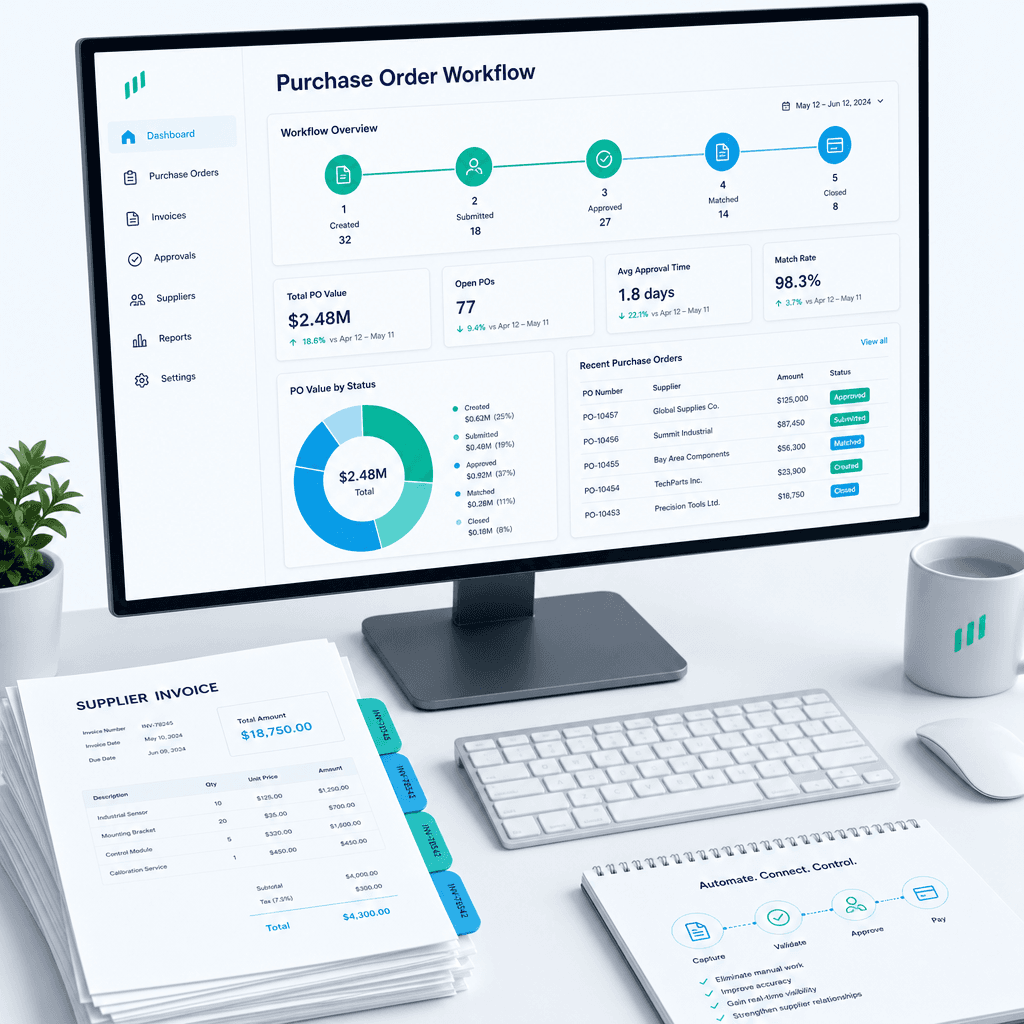
If your finance team is still raising purchase orders in a shared inbox, chasing approvals over email, and manually matching invoices line by line before month end, you are not running a slow process. You are running an expensive one. The hours consumed by manual PO handling compound quietly across every finance team in Australia, and most never get measured until a CFO starts counting them.
This guide is written for Australian finance leaders who want to cut PO cycle times and eliminate manual matching errors without the disruption of a system replacement. I will walk through what purchase order automation actually is, where it sits inside procure-to-pay, the specific friction points that cost the most time, how modern automation works in practice, and how to scope an engagement that ships results rather than projections. Every claim here comes with the numbers attached, measured after go-live.
The argument I will make throughout is not that automation is universally easy or cheap. It is that the biggest barrier for most Australian finance teams is not their legacy ERP or their current AP system. It is the assumption that those systems need to be replaced before automation can begin. They do not. The work we have shipped consistently proves the opposite.
Key Takeaways
- Purchase order automation covers the full cycle from PO creation through approval, goods receipt, invoice matching, exception handling, and close-out, and every stage carries measurable manual cost.
- The highest-friction points in a typical Australian AP environment are approval routing, three-way matching, and exception resolution. These are also the stages where automation returns the most time.
- Intelligent document understanding combined with RPA can achieve greater than 95% AP invoice coding accuracy and process 75% of supplier invoices without any human intervention.
- Legacy ERPs and existing AP systems almost never need to be replaced. Automation built around current infrastructure consistently outperforms migration projects on both speed-to-value and risk profile.
- Outcomes are the only honest scorecard: hours returned, error rates eliminated, and cycle times shortened. Not licences purchased or platforms deployed.
- A practical engagement starts with mapping the current process, attaching numbers to each friction point, and shipping automation incrementally against the highest-cost steps first.
Summary Table
| Stage | Manual Time Cost | Automation Approach | Typical Outcome |
|---|---|---|---|
| PO creation and coding | 5-15 min per PO, error-prone | Templated rules, ERP integration, auto-coding | 80-90% time reduction |
| Approval routing | 1-3 days average cycle | Rule-based routing, mobile approvals, escalation logic | Same-day or next-hour approval |
| Goods receipt matching | Manual cross-check, often skipped | Two-way and three-way auto-match against PO and GRN | 75%+ invoices fully auto-matched |
| Invoice coding and posting | 4+ hours per batch, error rates 5-15% | Intelligent document understanding, RPA posting | >95% coding accuracy, 65% faster processing |
| Exception handling | Ad hoc, no audit trail | Exception-only workflow, auto-escalation | Senior staff handle only genuine exceptions |
| Close-out and reconciliation | Monthly manual reconciliation | Automated close triggers, real-time dashboard | 80% reduction in close cycle time |
What Purchase Order Automation Actually Is, and Where It Sits in Procure-to-Pay
A purchase order is a formal document a business raises to authorise a spend commitment with a supplier. It records what is being purchased, at what price, in what quantity, and under what terms. That sounds straightforward. The complexity emerges when you map every human touch point between the moment a requisition is raised and the moment the matched, approved, coded invoice is posted to the general ledger.
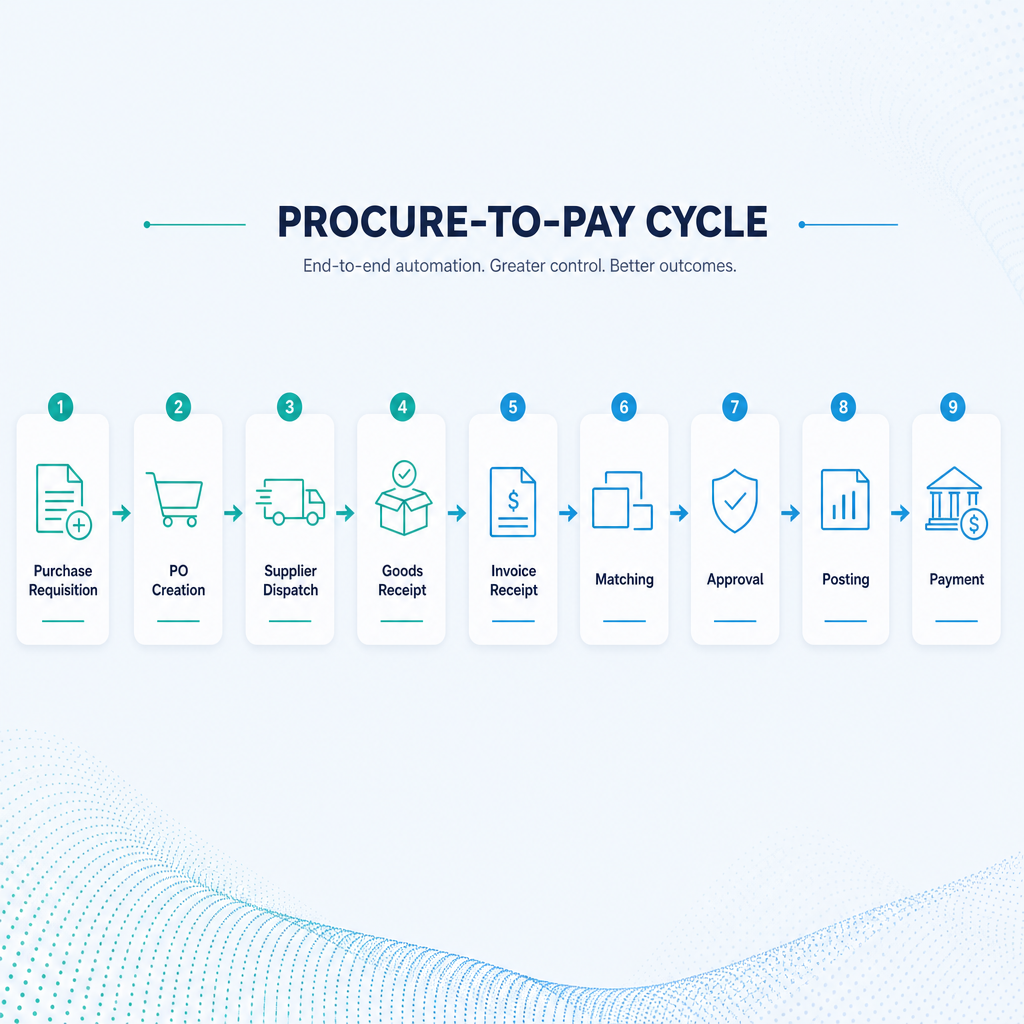
Procure-to-pay (P2P) is the end-to-end process that connects procurement decisions to financial settlement. It includes purchase requisition, PO creation, supplier dispatch, goods or services receipt, invoice receipt, matching, approval, posting, and payment. Purchase order automation is not a single product. It is the application of rules-based logic, robotic process automation, and intelligent document understanding to the manual steps inside that cycle.
Where most vendors go wrong is treating PO automation as a procurement software category. It is not. It is a process-level intervention. The right question is not "which PO automation platform should we buy?" It is "which specific steps in our current P2P cycle are consuming the most time and generating the most errors, and what is the most direct way to eliminate those?"
For most Australian finance teams, the answer involves some combination of the following capabilities:
Intelligent document understanding (IDU): The ability to read, interpret, and extract structured data from unstructured supplier documents, including invoices that arrive as PDFs, images, or email attachments with no consistent format. IDU goes beyond basic OCR. It learns document layouts, handles variation across suppliers, and extracts line-item data with enough accuracy to support automated matching without human review on the majority of documents.
Rules-based approval routing: Logic that determines who needs to approve a PO or invoice based on cost centre, spend category, dollar value, or supplier type, and routes the document automatically without a human coordinator managing the queue.
Two-way and three-way matching: Automated comparison of the invoice against the purchase order (two-way) and, where a goods receipt note exists, against both the PO and the GRN (three-way). Discrepancies trigger exceptions rather than holding up clean matches.
RPA-driven ERP integration: Robotic process automation that interacts with existing ERP and accounting systems at the interface level, reading and writing data without requiring the ERP to expose an API. This is what makes it possible to automate against a legacy system that was never designed for integration.
Exception-only workflow: The routing of only mismatched, incomplete, or flagged documents to human reviewers, so that finance staff are spending their time resolving genuine problems rather than processing clean transactions.
Together, these capabilities form the automation layer that sits between your existing systems and the manual work your team is currently doing to bridge the gaps.
The Manual PO Friction Points: Where the Time and Errors Actually Live
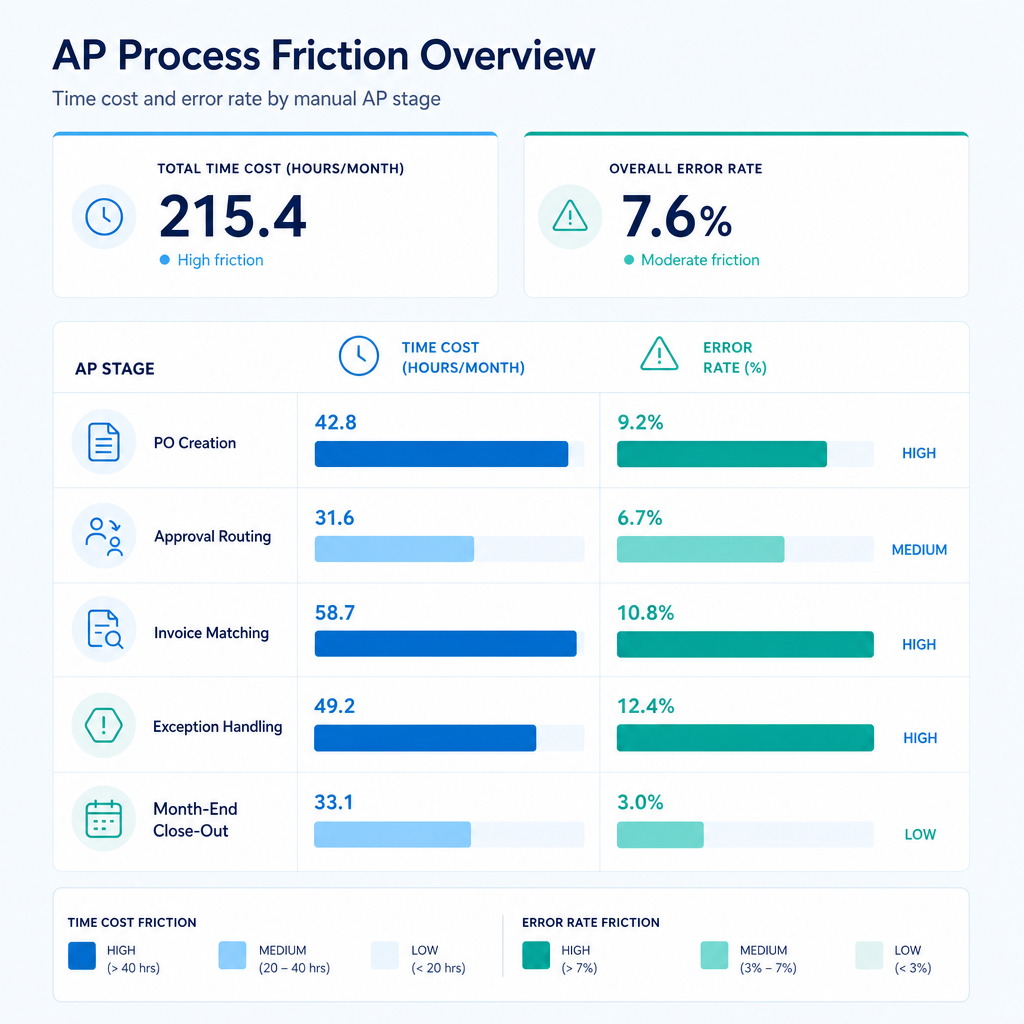
Before quoting automation outcomes, it is worth being precise about where the manual cost is concentrated. In my experience mapping P2P processes across Australian businesses, the friction is almost never evenly distributed. It clusters in predictable places, and those clusters are where automation returns the most value.
Raising and Coding the PO
In a manual environment, PO creation starts with a requisition, often raised in email or a shared form, that someone then translates into a PO in the ERP. The coding step, assigning the right cost centre, GL code, and project reference, requires the person creating the PO to know the chart of accounts well enough to make that call correctly every time. When they do not, the error propagates forward through matching and close.
For businesses processing hundreds of POs per month, the aggregate time is significant. But the bigger cost is often not time. It is the downstream error rate that accumulates when coding is done inconsistently across different staff members, different depots, or different periods.
Approval Routing
Manual approval processes rely on people knowing who needs to approve what, remembering to follow up when approvals are delayed, and maintaining enough visibility over the approval queue to catch bottlenecks before they hold up month-end. In practice, approval cycles in manual environments average one to three days for standard POs. Complex or high-value POs can sit for a week or more if the approver is travelling or the email gets buried.
This is not a technology problem at its core. It is a coordination problem, and coordination problems are exactly what rules-based routing eliminates.
Invoice Receipt and Matching
This is the highest-friction stage for most AP teams. Supplier invoices arrive in multiple formats, across multiple channels, referencing PO numbers in inconsistent ways or not at all. The task of matching each invoice to its PO, and then to the goods receipt note where one exists, is manual, time-consuming, and prone to error precisely because it requires cross-referencing data from multiple systems that were never designed to talk to each other.
I worked with a national logistics provider whose AP team was processing invoice batches that consumed approximately four hours per batch. Each batch required manual document handling, coding, and filing across multiple depots, with no consistent process enforced. The inefficiency was not a staffing problem. The process design was the problem. After layering OCR and workflow logic directly into the existing SharePoint environment, with no new software introduced, AP cycle time dropped from four hours to fifteen minutes per batch, and filing accuracy reached 100% across all depots from day one.
That outcome did not require a new AP platform. It required a clear map of where the four hours were going, and targeted automation against those specific steps.
Exception Handling
Exceptions are invoices that cannot be automatically matched because of a price discrepancy, a missing PO reference, a quantity variance, or a duplicate. In a manual process, every invoice is effectively treated as a potential exception because there is no automated matching to separate the clean ones from the genuine problems.
When 75% of invoices are clean and auto-matchable, handling all of them as if they require review is a structural waste of experienced finance staff time. The exception-only workflow flips this: automation handles the clean 75%, and staff apply their expertise to the 25% that genuinely need it.
Close-Out and Reconciliation
At month end, open POs need to be reviewed, matched commitments confirmed, accruals posted, and any unmatched items resolved before the books can close. In a manual environment, this consumes significant time and carries real risk of error, particularly when PO data lives in a different system to invoice data, and both differ from what has actually been receipted.
Automated close-out logic, triggered by confirmed matching, eliminates most of this work. When clean transactions close automatically and exceptions are flagged in real time rather than discovered at month end, the monthly close becomes a review exercise rather than a reconstruction exercise.
How Automation Works in Practice: The Technical Layer Explained
Intelligent Document Understanding in the PO Context
The bottleneck in most AP automation projects is document variability. Suppliers do not send invoices in a standard format. A business processing invoices from 200 suppliers is effectively processing 200 different document layouts, some of which change periodically without notice.
Basic OCR reads text from a document. Intelligent document understanding goes further: it identifies the structure of the document, locates relevant fields (invoice number, PO reference, line items, totals, GST, supplier ABN), extracts them with confidence scores, and handles layout variation without requiring a manually configured template for each supplier.
In enterprise AP environments, IDU combined with RPA-driven ERP posting has delivered greater than 95% coding accuracy and a 65% improvement in invoice processing speed, with senior finance staff freed from document-level review. The remaining sub-5% of documents that fall below the confidence threshold route to the exception queue for human review. That is the exception-only workflow in practice.
Two-Way and Three-Way Matching Logic
Two-way matching compares the supplier invoice to the purchase order on price, quantity, and supplier identity. If all three match within defined tolerances, the invoice is approved automatically. Three-way matching adds the goods receipt note, confirming that what was ordered and invoiced was actually received.
The business case for three-way matching is strongest in manufacturing, distribution, and logistics, where goods receipt is a formal step and the risk of paying for undelivered items is real. For service-based POs where no physical receipt exists, two-way matching is the appropriate standard.
Automated matching logic can be configured to handle the edge cases that trip up manual processes: partial deliveries matched to partial invoices, price variances within a tolerance band, and supplier invoices that reference a PO number in a non-standard field. The exception queue catches genuine discrepancies rather than flagging every imperfect format.
Approval Routing Built Around the Existing ERP
Approval routing does not require a new procurement platform. The routing logic, including spend thresholds, cost centre ownership, delegated authority matrices, and escalation timers, can be built as a layer that sits on top of the existing ERP, reading PO data from the system of record and pushing approvals through email, a simple web interface, or a mobile-accessible queue.
This matters because most Australian businesses already have a delegated authority policy. The automation task is to enforce that policy systematically rather than relying on individuals to apply it consistently. When an approval sits in a queue for longer than the defined escalation period, the system routes it to the next delegate automatically. No coordinator required.
RPA as the Integration Layer for Legacy Systems
The question I hear most often from finance leaders running legacy ERPs is: "Can we automate without replacing the system?" The answer, consistently, is yes.
RPA bots interact with software applications at the interface level, the same way a human user would, reading screens, entering data, navigating menus, and triggering actions. This means a bot can drive a legacy ERP that has no API, no modern integration capability, and no vendor support for custom connectors, and do so reliably and at scale.
I have done exactly this for a family-owned logistics operator running a twenty-year-old ERP alongside Xero. Finance staff were manually re-keying data between the legacy system and reporting tools every month, consuming hours and introducing reconciliation errors. The solution was an RPA bot that drives the legacy ERP interface directly, validates extracted data against SQL, and syncs clean records into Xero and reporting dashboards automatically. The legacy ERP did not change. The manual work disappeared. The result was 160 hours per month returned to the finance team, with data integrity maintained across both systems from day one of go-live.
That is the principle applied directly. No aspirational projections. The 160 hours is a number measured after go-live.
The Legacy-Systems-Stay Principle: Why Building Around Beats Replacing
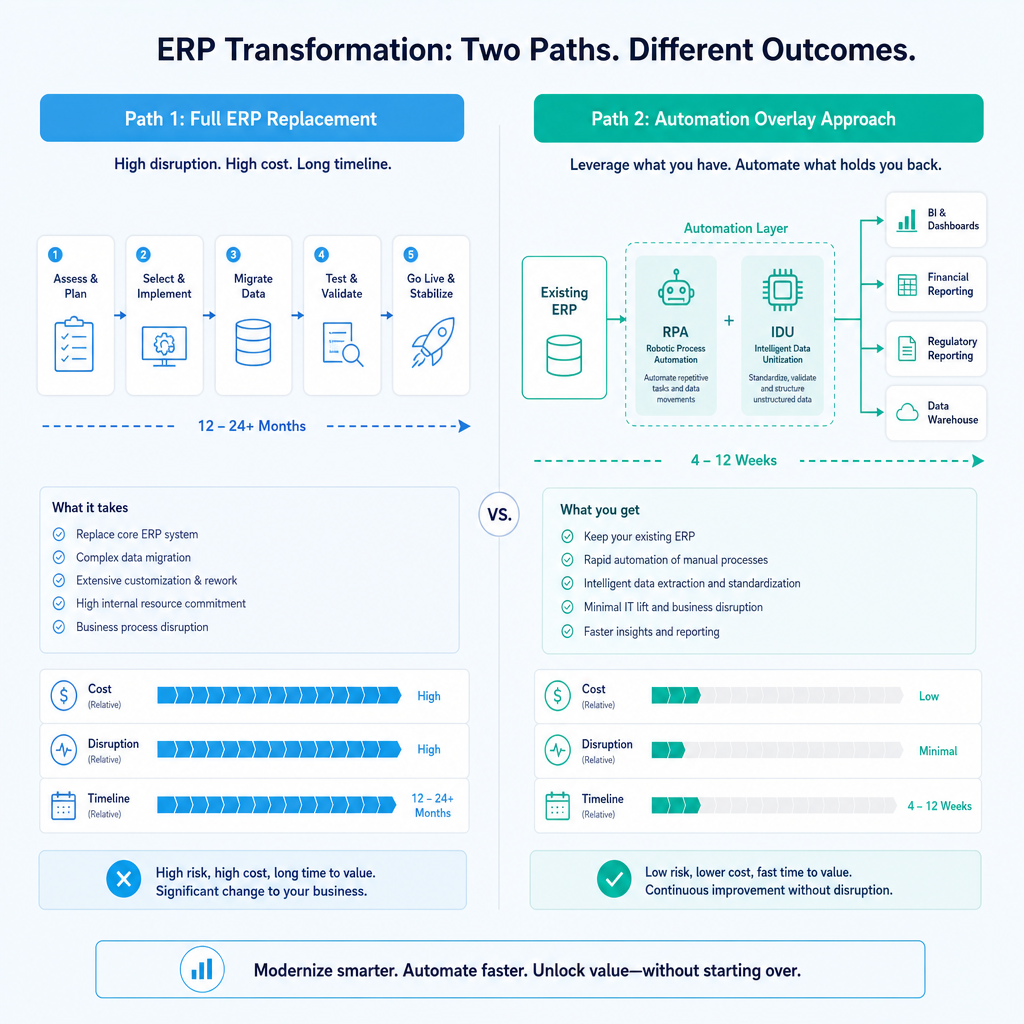
The conventional advice in the procurement software market is that meaningful automation requires a modern, integrated platform. Vendors with something to sell will tell you that your legacy ERP is the barrier, and that you need to replace it, or at minimum buy a connected procurement suite, before automation becomes possible.
I disagree with that position, and the work we have shipped backs the disagreement.
Legacy systems persist in Australian businesses for reasons that are entirely rational. They may hold decades of transaction history. They may be deeply embedded in operational workflows that have nothing to do with finance. The cost and risk of migration, including data integrity during transition, staff retraining, and the near-certain project overrun that accompanies large ERP migrations, frequently exceeds the projected benefit. And the projected benefit is usually an aspirational number rather than one measured against a real baseline.
The alternative is to treat the existing system as a fixed input and build automation around it. This means:
- Using RPA to read and write to the legacy ERP without requiring API access
- Using IDU to process incoming documents in whatever format they arrive, regardless of what the ERP expects
- Using rules-based routing to enforce approval logic without modifying the ERP's native workflow
- Using a lightweight integration layer to sync clean, validated data between the legacy system and any downstream reporting or accounting tools
The outcome is the same as a full platform migration in terms of the finance team's daily experience: manual steps eliminated, cycle times reduced, errors caught before posting. But the timeline is weeks rather than years, the cost is a fraction, and the operational risk is contained to the automation layer rather than the entire financial system.
For Australian finance leaders specifically, this matters because the disruption cost of a migration is real and often underweighted. An Australian mid-market business running a legacy ERP is not doing so out of inertia alone. There are usually operational dependencies, reporting customisations, and historical data requirements that make a clean migration genuinely difficult. Building around the existing system respects that reality.
This is not a universal argument against ever replacing a system. If an ERP is genuinely end-of-life, unsupported, and creating security or compliance risk, replacement may be warranted on those grounds. But the automation case alone, the argument that you cannot get AP efficiency gains until you upgrade, is one that the numbers consistently disprove.
Measuring Outcomes That Matter: The Scorecard for PO Automation
The temptation when evaluating automation is to measure inputs: which platform was deployed, how many integrations were built, what percentage of the P2P cycle is technically automated. These are easy numbers to generate and difficult to verify independently. They are also not the numbers that tell a finance leader whether the engagement was worth doing.
The scorecard I use, and the one I recommend every Australian finance leader apply when evaluating any PO automation engagement, has three lines:
Hours returned per month. Before the engagement, how many staff hours per month were consumed by the steps being automated? After go-live, how many hours does the same volume of transactions require? The difference is the real return. In a well-scoped engagement, this number should be visible within the first month of operation. Across Ordron engagements, the top result is 160 hours per month returned to a single finance team. Across the full case study library, covering eight industries, maximum manual work reduction has reached 85%.
Error rate before and after. Manual AP processes typically carry coding error rates of 5% to 15%, depending on document complexity and staff consistency. These errors have downstream costs: supplier queries, credit notes, duplicate payments, reconciliation time at close. Automated coding with IDU has delivered greater than 95% accuracy in enterprise AP environments. The shift from a 10% error rate to a sub-5% error rate across thousands of monthly invoices is a material reduction in rework and risk.
Cycle time for key steps. How long does it take from invoice receipt to approved, posted transaction? How long does PO approval take from creation to sign-off? How long does month-end close take once the final invoices are in? These cycle times are measurable before and after, and they tell you whether the automation is actually changing the working experience of the team or just adding a digital wrapper around the same manual steps.
A fourth outcome worth tracking for businesses with complex supplier bases is the auto-processing rate: the percentage of invoices that complete the full cycle, from receipt to posting, without any human intervention. For a national manufacturer processing thousands of supplier invoices monthly through shared inboxes, 75% of invoices now process fully automatically without human intervention. The remaining 25% route to the exception queue as genuine exceptions, not as routine documents that happen to need a human stamp.
Results at a glance across Ordron engagements:
- Up to 85% reduction in manual work
- 160+ hours per month returned (single engagement)
- Greater than 95% AP invoice coding accuracy
- 75% of supplier invoices fully auto-processed
- AP cycle time from 4 hours to 15 minutes per batch
- Monthly close cycle time reduced by 80%
None of these are projections. They are numbers measured after go-live, against baselines established before the work started.
How to Scope a PO Automation Engagement: From Process Map to Shipped Automation
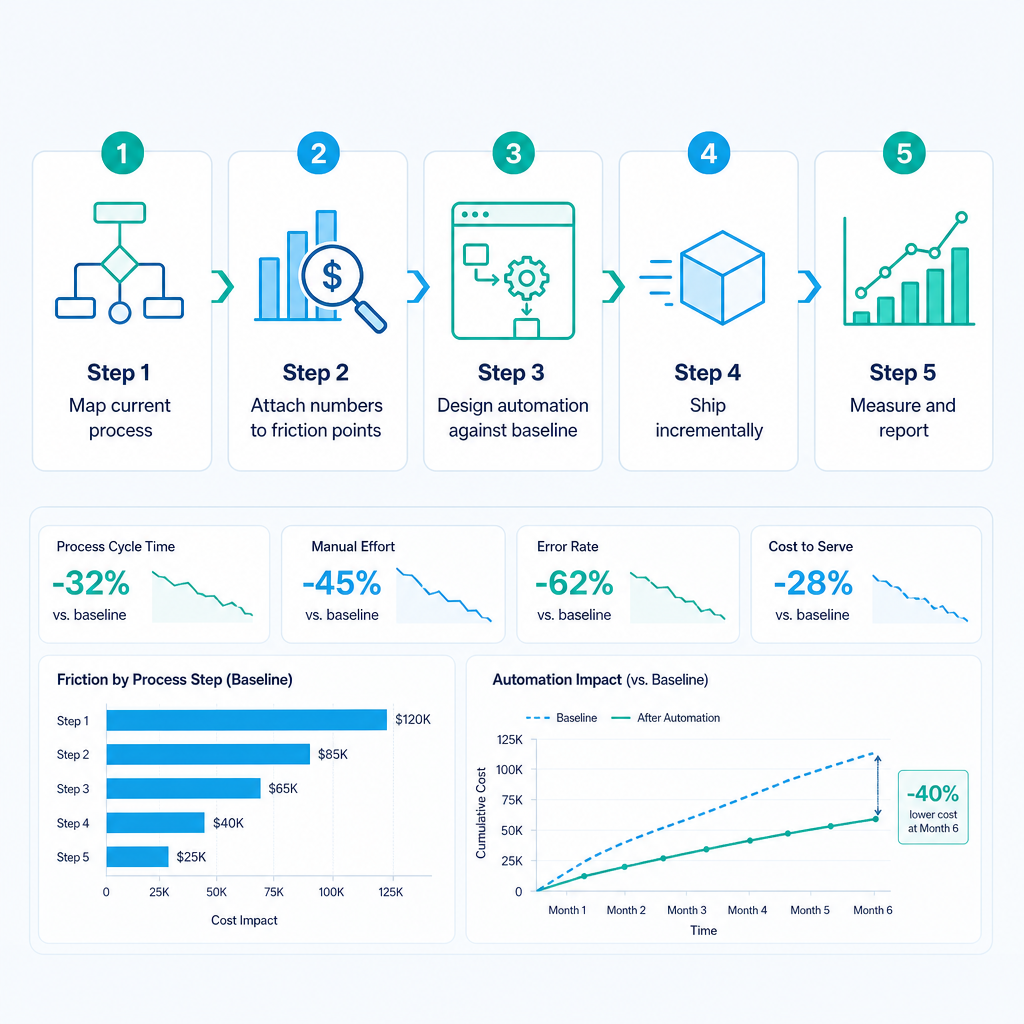
The most common mistake in automation projects is starting with a technology decision. A finance leader reads about an AP automation platform, books a vendor demo, and then works backwards to figure out whether their process fits the product. This approach almost always produces a solution optimised for the vendor's capability rather than the team's actual friction.
The right starting point is the current process, mapped in detail, with a number attached to every manual step.
Step 1: Map the Current PO and AP Process End to End
This means walking through every step from requisition to payment and documenting:
- Who does the task
- How long it takes per transaction
- How many transactions per month
- What system or tool is involved
- Where errors are most likely to occur
- What happens when something goes wrong
For most Australian mid-market businesses, this process map reveals two or three steps that account for the majority of the manual time and the majority of the errors. Those are the automation targets. Everything else is secondary.
The process mapping step is not glamorous, and it is easy to skip when a vendor is promising a platform that automates everything. Do not skip it. The specificity of the map is what separates automation that returns measurable hours from automation that generates a dashboard nobody uses.
Step 2: Attach Numbers to the Friction Points
For each high-cost step identified in the map, calculate:
- Hours consumed per month (staff time per transaction multiplied by monthly volume)
- Error rate and the downstream cost of resolving those errors (rework time, supplier queries, duplicate payment risk)
- Cycle time impact on month-end close or supplier payment terms
These numbers become the baseline. They are also the numbers that define success. If the automation target is to reduce invoice batch processing from four hours to fifteen minutes, that outcome is either achieved or it is not. No aspirational projections. The baseline exists before the work starts, and the outcome is measured after go-live.
Step 3: Design the Automation Against the Baseline, Not the Ideal State
A common mistake is designing for the process you wish you had rather than the one you actually have. If invoices currently arrive via a shared email inbox, the automation design should handle that exact channel, not assume that suppliers will adopt a portal. If the ERP has no API, the integration design should use RPA at the interface level, not wait for an upgrade that may never come.
This is where the legacy-systems-stay principle becomes practical. The automation layer is designed to work with what exists, which means it can be built and tested against real transaction data from the first week of development, rather than depending on a parallel system implementation.
Step 4: Ship Incrementally, Measure at Each Stage
PO automation does not need to be deployed as a single project covering the full P2P cycle. The highest-value steps can be automated first, generating measurable hours returned and error reduction within weeks, while lower-priority steps follow in subsequent phases.
For a business where invoice matching is the primary bottleneck, the first phase might cover IDU extraction, two-way matching, and exception routing, with approval workflow automation following in phase two. The finance team experiences the benefit of phase one before phase two begins, which builds confidence, surfaces edge cases in a lower-stakes environment, and ensures that each phase is validated against real data before the next one starts.
This is also how you find your automation quick wins: by mapping the process, identifying the single step that consumes the most time per month, and shipping automation against that step first.
Step 5: Measure and Report Against the Baseline
After go-live, the first monthly report should compare actual transaction volumes, processing times, and error rates against the pre-automation baseline. If the numbers are not moving in the right direction, that is useful information that informs the next iteration. If they are, the report quantifies the return on the engagement in terms that a CFO can present to a board.
This is the accountability mechanism that most automation projects lack. When outcomes are measured against a documented baseline, there is no ambiguity about whether the engagement succeeded.
The Compliance and Audit Dimension for Australian Finance Teams
Australian finance teams operate under specific regulatory obligations that make AP accuracy and auditability non-negotiable. The Australian Taxation Office requires accurate GST coding on all supplier invoices, with the supplier's ABN verified and the GST amount correctly attributed. Errors in AP coding that affect BAS reporting create compliance risk that extends well beyond the inconvenience of reconciliation.
The Australian Competition and Consumer Commission and the ATO both have mechanisms for reviewing business payment practices, and the Payment Times Reporting Act 2020 imposes additional obligations on large businesses regarding how quickly they pay small business suppliers. Automated PO and AP processes create a complete, time-stamped audit trail for every transaction, from receipt to posting to payment, that manual processes cannot reliably replicate.
For mid-market and enterprise Australian businesses, the audit trail value of automation is often undersold relative to the efficiency case. When every document has a captured receipt timestamp, an extraction confidence score, a matching result, an approval record, and a posting confirmation, the finance team can respond to any audit query or supplier dispute in minutes rather than hours of archive searching.
The GST coding accuracy improvement from manual to automated processing has a direct impact on BAS accuracy. At greater than 95% coding accuracy across all supplier invoices, the residual manual review workload for GST purposes is contained to the exception queue rather than spread across the full invoice population.
Common Questions Finance Teams Ask Before Starting
Before walking through the FAQs formally, it is worth addressing the three questions that come up most often in process mapping conversations with Australian finance leaders.
"We are upgrading our ERP in eighteen months. Should we wait?" No. The manual cost your team is absorbing today will continue for eighteen months and beyond. ERP upgrades rarely eliminate the AP friction points described in this guide, because those friction points exist in the process design, not the platform. Automation built around the current ERP can typically be adapted or rebuilt to work with the new system at a fraction of the original cost. Do not wait.
"Our invoice volumes are not high enough to justify automation." Volume is the wrong metric. The right metric is the hours your team is spending on manual steps per month and the error rate those steps generate. A business processing 200 invoices per month with a four-hour batch processing cycle and a 10% error rate has a clear automation case. A business processing 2,000 invoices per month with a streamlined, low-error process may have less urgency. Map the process and attach numbers. The volume will tell you less than the time cost.
"We have tried automation before and it did not stick." Automation that does not stick usually failed because it was designed around an ideal process rather than the actual one, or because it was deployed as a single large project with no incremental validation. The approach described in this guide, map first, attach numbers, ship incrementally, measure after go-live, is specifically designed to avoid those failure modes.
References
- Australian Taxation Office. GST for businesses. ATO, 2026. https://www.ato.gov.au/business/gst/
- Australian Government. Payment Times Reporting Act 2020. Federal Register of Legislation, 2020. https://www.legislation.gov.au/Details/C2020A00135
- Australian Bureau of Statistics. 8155.0 Australian Industry, 2022-23. ABS, 2024. https://www.abs.gov.au/statistics/industry/industry-overview/australian-industry/latest-release
Ready to Quantify What Automation Can Return to Your Finance Team?
If your team is still processing POs and invoices manually, the cost of that process is measurable. Ordron runs a process mapping session specifically for Australian finance teams: a structured review of your current PO and AP workflow that maps the friction points, attaches hours and error rates to each step, and quantifies the reduction available through targeted automation, with no system replacement required.
The session takes the aspiration out of the conversation and replaces it with a specific picture of what automation could return to your team, measured against your actual baseline.
Book a process mapping session with Ordron at https://ordron.com/.
Frequently asked questions
- What is purchase order automation?
- Purchase order automation is the application of rules-based logic, robotic process automation, and intelligent document understanding to the manual steps in the purchase order and accounts payable cycle. It covers PO creation and coding, approval routing, invoice receipt and matching, exception handling, and close-out. The goal is to eliminate manual touch points from clean transactions so that finance staff spend their time on genuine exceptions and higher-value work.
- Do we need to replace our ERP to automate our PO process?
- No. RPA-based automation interacts with existing ERP systems at the interface level, without requiring an API or a modern integration layer. Businesses running legacy ERPs that are decades old have achieved greater than 160 hours per month in time savings without any ERP change. The automation layer works around the existing system, not through it.
- What is the difference between two-way and three-way matching?
- Two-way matching compares a supplier invoice to the purchase order on price, quantity, and supplier identity. Three-way matching adds the goods receipt note, confirming that the goods or services were actually received before the invoice is approved. Three-way matching is most relevant for manufacturing, distribution, and logistics businesses where physical receipt is a formal step. For service-based procurement, two-way matching is typically sufficient.
- How long does a PO automation project take to deliver results?
- A well-scoped, incremental engagement targeting the highest-friction steps first can deliver measurable results within four to eight weeks of go-live. The process mapping and design phase typically takes two to four weeks. The first automation phase deploys and is measured against the baseline within the first full month of operation.
- What percentage of invoices can be processed without human intervention?
- In well-structured AP environments, 75% or more of supplier invoices process fully automatically without human intervention. The remaining documents route to an exception queue for human review, so that experienced finance staff spend their time on genuine discrepancies, not on processing clean transactions.
- How is PO automation accuracy measured?
- Accuracy is measured against the baseline established before automation, specifically coding accuracy, matching accuracy, and exception rate. In enterprise AP environments using intelligent document understanding, coding accuracy consistently exceeds 95%.
- Is PO automation relevant for small and mid-sized Australian businesses, or only for large enterprises?
- It is relevant for any Australian business where the manual cost of the PO and AP process is measurable and the error rate creates downstream compliance or reconciliation risk. A business processing 150 to 200 invoices per month with significant manual handling time has a clear case. The starting point is always the process map with numbers attached, not the invoice volume in isolation.
- What does Ordron's process mapping session involve, and what does it cost?
- Ordron's process mapping session involves reviewing the current PO and AP workflow in detail, identifying the specific friction points consuming the most time, and quantifying the hours and error reduction available through targeted automation, with no system replacement required. It is the first step in any engagement and the foundation for honest scoping rather than aspirational projections.
Ordron
Finance automation team, Sydney
Ordron builds the finance automation infrastructure that runs AP, AR, reconciliations and reporting on autopilot for Australian mid-market businesses.
More from the Ordron Insights catalogue
Selected by topic. Updated as the agent publishes.
Finance Automation Buyer's Guide for Australian Finance Teams: How to Choose, Scope & Measure Automation That Delivers (2026)
Most finance automation buying decisions are made the wrong way. Teams evaluate vendors on feature lists, watch polished demos, and sign contracts based on…
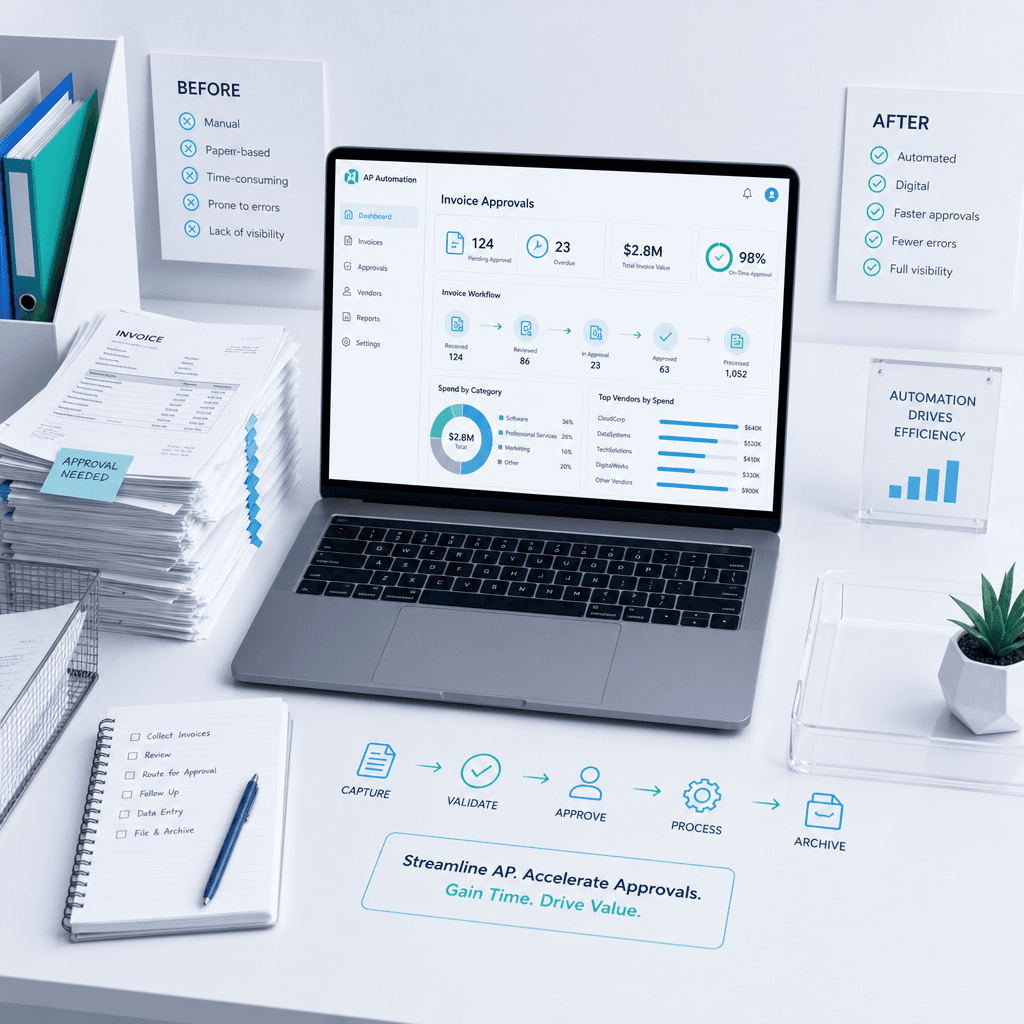
Accounts Payable Automation in Australia: How Finance Teams Eliminate Manual AP Processing (2026 Guide)
If your finance team is still manually keying supplier invoices, chasing approvers by email, and exporting ABA files from a spreadsheet, the cost is not…
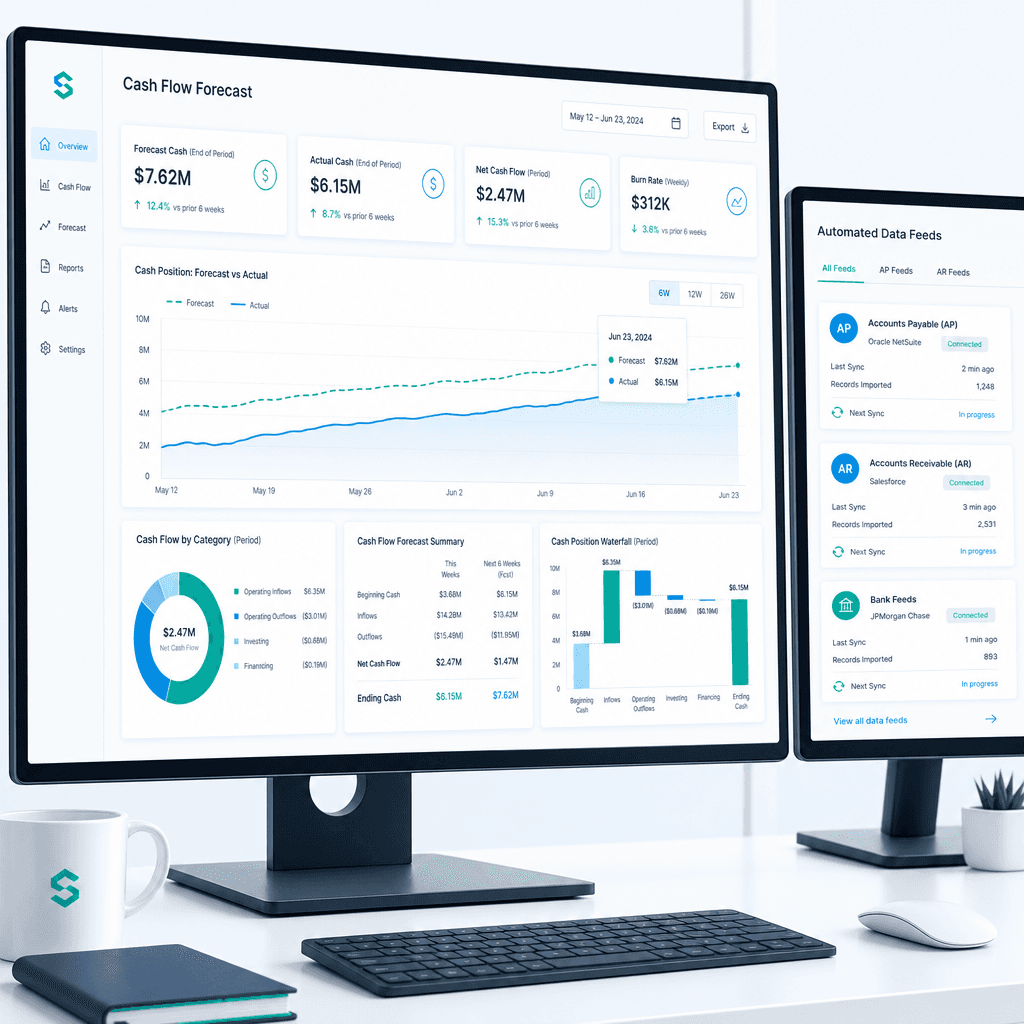
Cash Flow Forecasting Automation: A Practical Guide for Australian Finance Teams (2026)
If your finance team rebuilds the cash flow forecast from scratch every week or every month, you already know where the time goes. Someone pulls an AR ageing…